Salta al contenuto principale
Regione Emilia Romagna
Access to personal area

Procedura Piantone

Parte comune per tutte le tipologie di allerta

Last update: 2 September 2026, 11:36

Subjects :
Protezione civile

1) Accedere all'applicazione Municipium
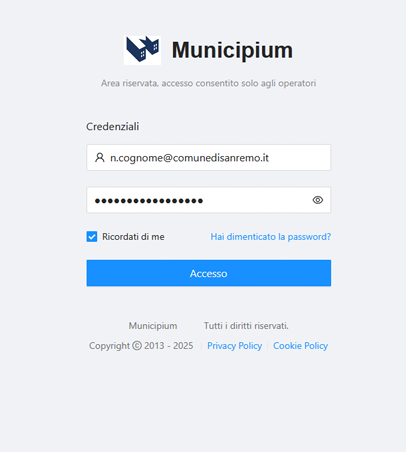
Screenshot 2026-08-25 101745

-> Il collegamento link è disponibile nella cartella “AREA LAVORO” -> PM_Piantone_Server

> oppure digitare sul browser: https://cloud.municipiumapp.it/#/passport/login ed inserire le proprie credenziali con il foramto della mail isitituzionale

2) Sul menù lato sinistro cliccare su -> MAC
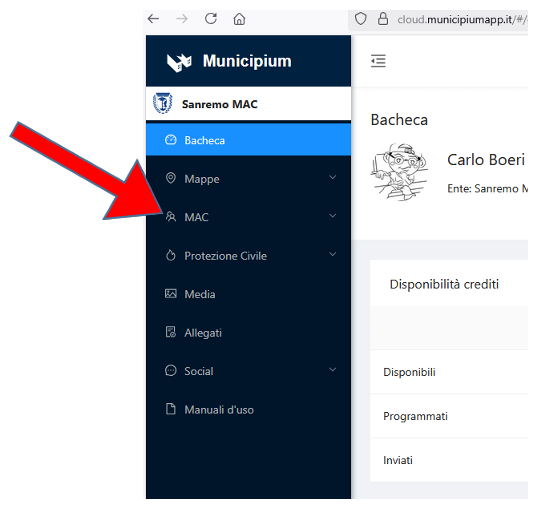
Screenshot 2026-08-25 102027

3) Cliccare su Comunicazione -> Nuova
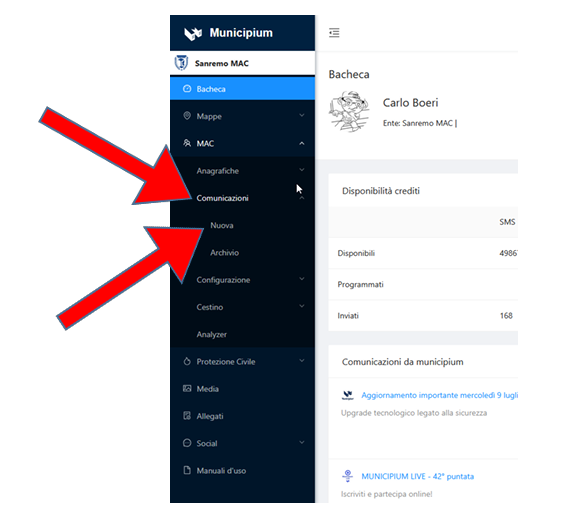
Screenshot 2026-08-25 102129

>>> SEGUIRE al Punto 4 e 4R delle rispettive Allerte >>>

Screenshot 2026-08-25 102306


How clear is the information on this page?

Valuta il Servizio

Thank you, your opinion will help us improve the service!

What were your favorite aspects?

1/2

Where did you encounter the most difficulties?

1/2

Do you want to add more details?

2/2

Please enter up to 200 characters
It is necessary to verify that you are not a robot
Cookie
This site uses technical cookies, analytics and third-party cookies. By continuing to browse, you accept the use of cookies. For more information see the Cookie Policy